Cashvy Not out yet

The bill splitter with no account and no server holding your ledger.

Sign-up
None
Open the app and start a trip. No email, no phone number, no password.
Your ledger
On your device
Not on an account, not on our machines. It works in airplane mode.
Your friends
Any browser
They open a link and add what they paid. Nothing to install.

Not on the App Store yet. A small group is testing it before release. Ask for a place.

Tuk-tuk tour €60.00

Sam paid €60.00 · split 4 ways

UnfiledFiledfrom the browser

Alex’s phoneTop copy · holds the ledger

Tuk-tuk tour €60.00

Sam paid €60.00 · split 4 ways

UnfiledFiledfrom the browser

Sam’s browserCarbon copy · added it

Sam added a tuk-tuk tour from his browser. It is on both copies, and unfiled on both, because only the app can stamp it.

Drawn for this page. The phones further down are the real app.

The app

The phone is the database.

These are screenshots of the app itself, with a made-up trip to Lisbon in it.

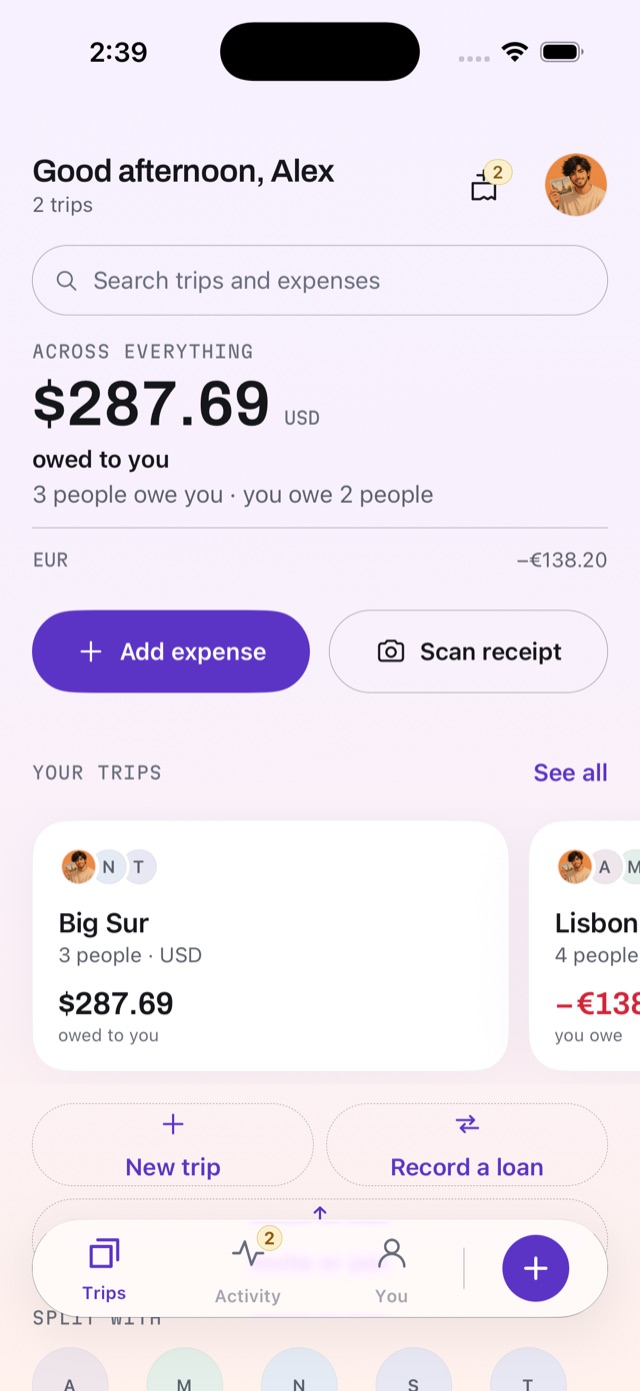
  1. Cashvy’s home screen: $287.69 owed to you in dollars, and a separate euro line showing −€138.20, kept apart rather than added together. Below, the Big Sur and Lisbon trips.

    Your trips

    Everything is on your device.

    No account and no sign-in. Open Cashvy in airplane mode and every trip, expense and balance is there, because there is nowhere else for them to be.

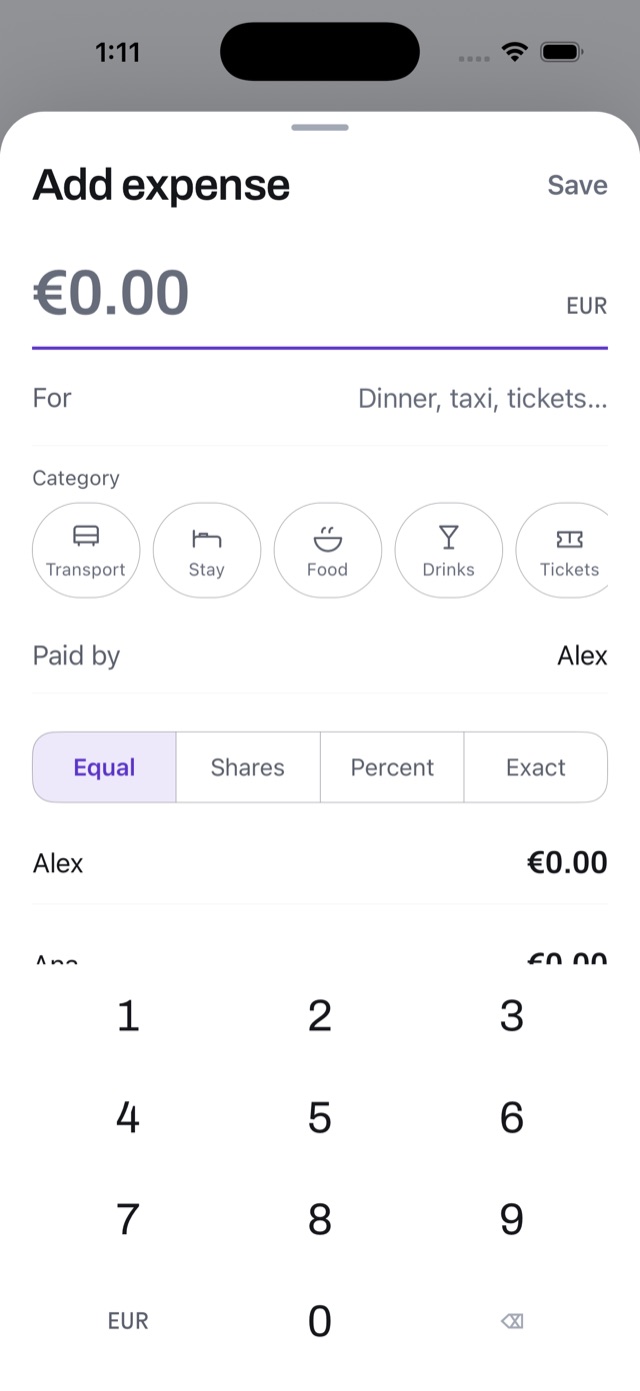
  2. The Add expense sheet: “Dinner at Ramiro”, €187.00, a date stepper reading Today, a category Cashvy guessed from the description (Food), a receipt tile and a repeat tile, over a number pad.

    Add

    One sheet, and the cents always add up.

    The amount, who paid, and how to split it: equally, by shares, by percentage or in exact amounts. Money is kept in whole cents, never fractions, so a split can’t lose one — and when a cent won’t divide, Cashvy says who took it.

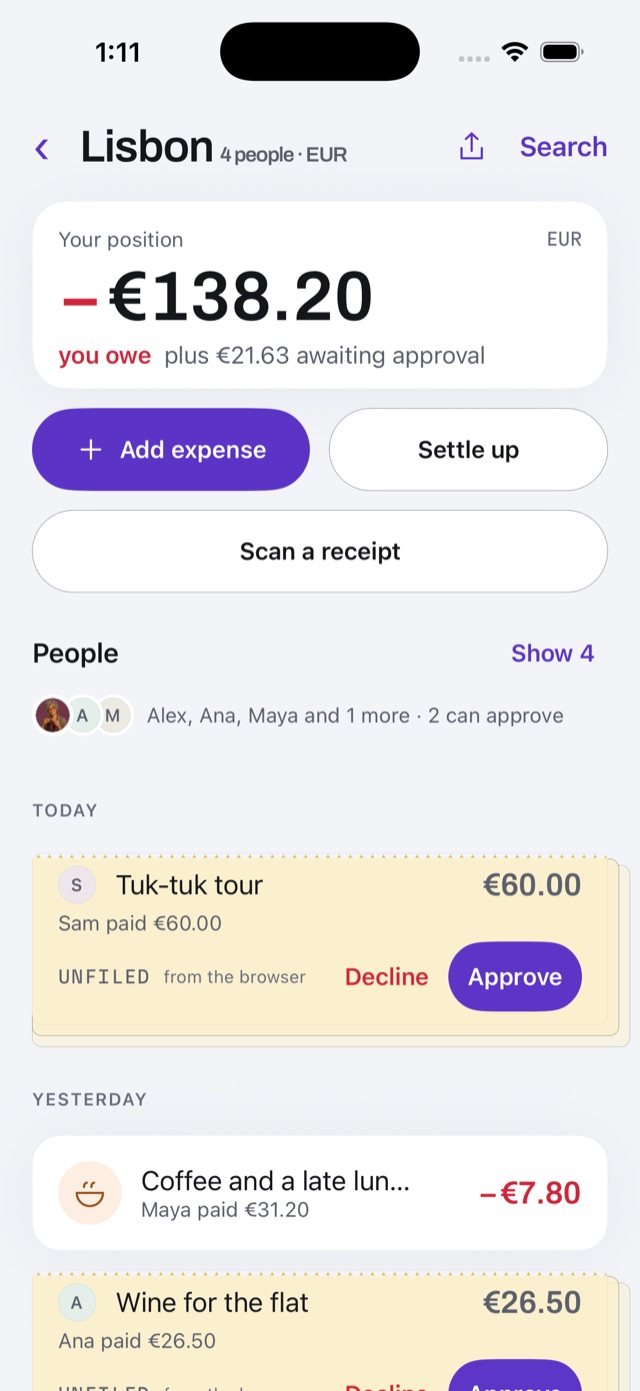
  3. The Lisbon trip ledger: −€138.20, you owe, and “You will owe €21.63 more once you approve”, then a list of expenses — two of them on yellow slips marked unfiled, from the browser, with Decline and Approve buttons.

    Approve

    Friends add from a browser. A phone decides.

    What a friend adds from a link lands as a yellow slip, unfiled until someone with the app approves or declines it. The browser can’t file it, whatever it sends — the phone refuses.

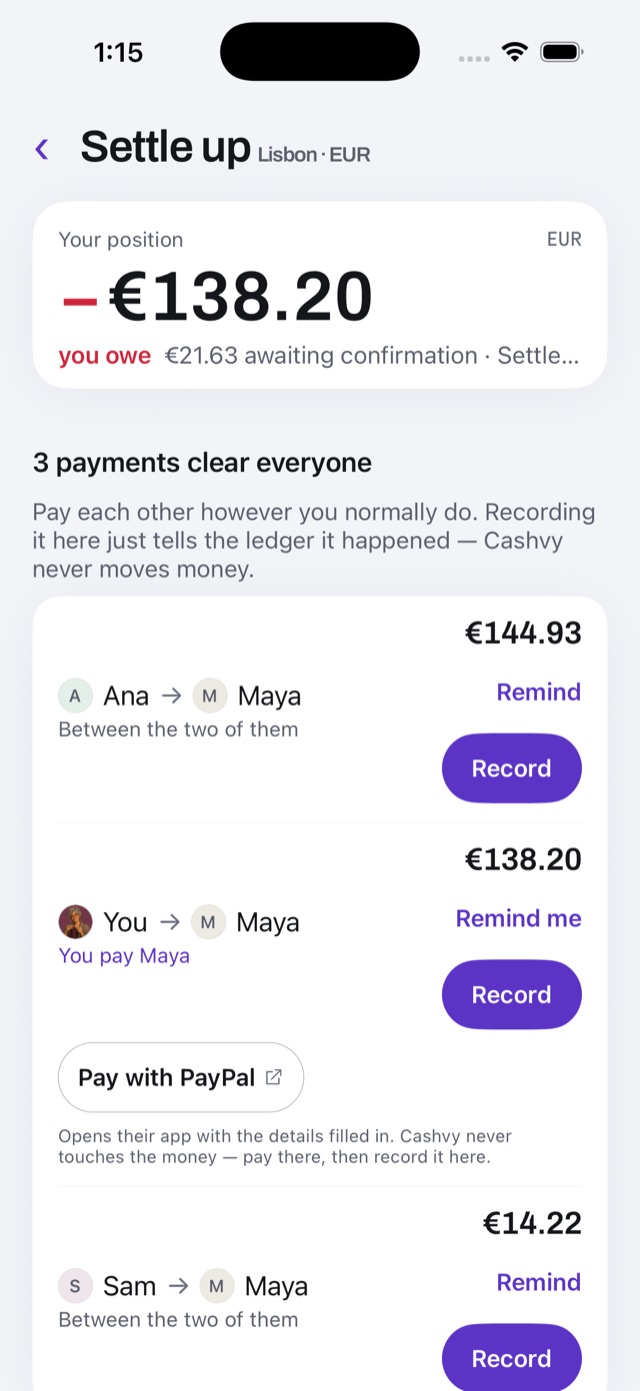
  4. The Settle up screen: three payments clear everyone, each with a Record button, and a note that Cashvy never moves money.

    Settle

    The fewest payments that clear everyone.

    Cashvy works out who pays whom and records each payment when you make it. It never touches the money — you pay however you already pay each other.

Screenshots: iPhone 17 Pro simulator, iOS 26.5, 12 October 2026. Sample data, not anybody’s money.

Never added up

There is no grand total.

Cashvy holds a position in every currency you spend in, and keeps them apart. Adding them would take one exchange rate for the whole column, and Cashvy has none — it never asks anybody for a rate.

Accounting has a mark for this. A single rule closes a subtotal. A double rule closes a total and means nothing follows. Cashvy draws the first under every currency it holds, and it has no second rule to draw.

The gap where that rule would go is the promise: nothing on this screen was converted at a rate you did not set.

Across everything
  1. USD $287.69 owed to you
  2. EUR €138.20 you owe
one currency, closed
the total of everything above — never printed here

Exact to the cent

€60.39 does not divide by four.

One bill, four people, and three cents that will not split. Here is where they go, and why every phone holding this trip agrees about it.

What the restaurant charged · EUR
2 Som tam 17.00
1 Green curry 12.50
3 Chang 14.40
2 Mango sticky rice 11.00
Subtotal 54.90
Service 10% 5.49
Total €60.39

€60.39 ÷ 4 = €15.0975, and nobody can pay three quarters of a cent. So Cashvy pays everyone the whole part — €15.09 each — and then gives out the 3 cents left over, largest fraction first.

Here all four fractions are identical, so that rule alone cannot choose. The tie breaks the only way that can come out the same on every phone: the order the four were added to the trip. Ana, Bo and Cleo were added first, so they take a cent each. Dev pays €15.09.

Run the same trip on Bo’s phone and the same three names come out. That is what lets two copies of a ledger merge after a day with no signal — not that they agree roughly, but that they agree exactly, down to which person absorbed which cent.

Measured in your browser, just now

Nothing on this page comes from anyone else.

No analytics, no session recording, no advertising pixel, and no fonts or scripts from another company. You don’t have to take that on trust: the receipt beside this is written by your own browser, and it grows as you scroll.

Then try the button. It asks this page to send a request to our own server — and your browser refuses, because the rules this site is served with don’t let it send anything, to anyone.

Prefer to look for yourself? Open your browser’s developer tools and watch the Network tab while you use this page.

cashvy.appFiles your browser loaded

  1. Turn on JavaScript to see this list — or use the Network tab.

    Your browser wrote this list, just now, as it drew the page. Nothing on it was sent to us.

    What else is in it

    Built for the table, not for a dashboard.

    • Receipts, read on the phone

      Photograph the bill and Cashvy reads the lines off it. The reading happens on the phone; the picture goes nowhere.

      Scan a receipt: Cashvy asks for a photo of the bill and says it reads the lines off it on the device itself, with Take a photo and Choose one buttons.
    • Where you stand with everyone

      One list of the people you split with, across every trip, and what each of you owes the other.

      The People screen, across every trip: Noor and Theo owe you dollars, you owe Maya €116.38 and Sam €31.00, and Ana owes you €9.18. Dollars and euros are never added together.
    • Everything waiting on you

      Every slip a friend added from a browser, from every trip, in one place to approve or decline.

      The Activity tab, “2 waiting on you”: two yellow unfiled slips added from the browser — a tuk-tuk tour and wine for the flat — each with Decline and Approve.
    • A trip, phone to phone, with no internet

      Hand a whole trip over by AirDrop, or by radio across the table. While it looks for phones nearby, it shows two random words and nothing else.

      The Nearby screen: “Nobody nearby can see this device.” Cashvy explains it can show a pair of words to other devices on the same table — nothing about you, nothing about this trip — and a button, Show me to people nearby.
    • Any currency, at the rate you paid

      An expense in another currency keeps the rate you type in, frozen onto it. Cashvy doesn’t look rates up, because looking something up is a request.

    • Encrypted, and kept out of iCloud

      The ledger is encrypted with a key that never leaves the phone. Your own backup is one file, opened by eight words that are shown to you once.

    Everything Cashvy does

    On join.cashvy.app

    Were you sent a link?

    A trip link opens in any browser, on a phone or a laptop — nothing to install and no account. If you typed cashvy.app instead of opening it, paste it here.

    It opens on join.cashvy.app. Everything after the # in your link is the key to the trip, and it stays in your browser — it is not sent to us, or to anyone.

    The Browser code screen for Lisbon, listing Ana, Maya and Sam, each with a Make a code button, and an empty list of browsers let in so far.
    On the host’s phone: a code is made for one person. It works once, for one browser, and stops working after fifteen minutes if nobody uses it.

    Questions

    The ones people ask first.

    All the questions

    Do my friends need the app?

    No. Anyone in a trip can read it and add what they paid from a browser. Approving expenses and settling up need the app, on at least one phone in the trip.

    Does Cashvy move money?

    No. It records who owes what and who paid whom. The payment happens wherever you already pay each other.

    What happens if I lose my device?

    If you made a Cashvy backup, you restore it onto the new device with its eight words. If you didn’t, the ledger is gone — there is no copy anywhere for anyone to recover. Why it works like that.

    When can I get it?

    Not yet. Cashvy is not on the App Store. A small group is testing it before release, and you can ask for a place.